Tampilkan postingan dengan label IT. Tampilkan semua postingan

Rabu, 30 Januari 2013

Running Eclipse for the first time

Running Eclipse for the first time


  • Find the file named Eclipse.exe (on Windows) or Eclipse (on Ubuntu) and then double-click
  • At the first run Eclipse, Eclipse will ask workspace, the folder where the project and it is put. You can place it anywhere as long as not in the Eclipse folder itself.
  • Click Browse and select the folder that is desired. Tick ​​"Use this as the default and do not ask again"
  • Opening page will appear. Click "Workspace", the rightmost button-shaped arrows to fit into your workspace.
Your first Java program :

  • Click "File -> New -> Java Project"
  • Fill in the project name (example :  SelamatDatang), then click "Finish"
  • After Eclipse project for making your workspace on the left you will see your project directory structure that starts with the name of the project, the src folder, and the folder JRE System Library
  • Right click on the src folder, then "New -> Package"
  • Fill in name of the package (example :  selamatdatang), then click "Finish"
  • Right-click again on selamatdatang folder, then "New -> Class"
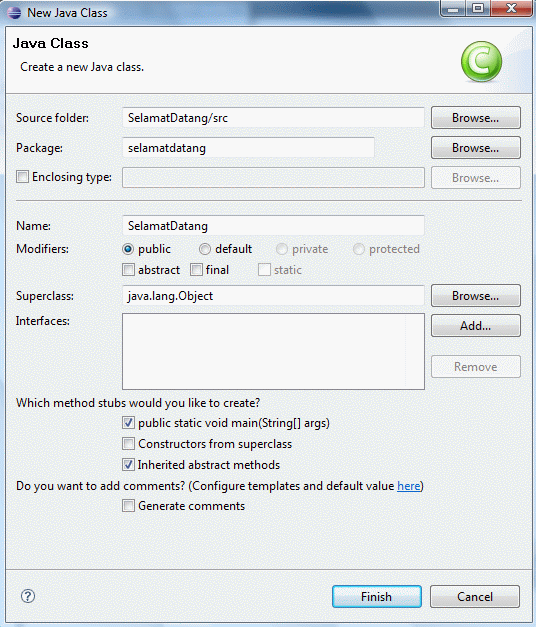
  • Fill in the name of the class (example : SelamatDatang)
  • Because this class is the main class that will be directly executed by the JRE (Java Runtime Environment), click "public static void main (String [] args)" in the "Which method stubs would you like to create?"
This is an example of a print screen that I created :


  • Click "Finish"
  • Eclipse will create a program that contains an empty package and class according to the name you entered in the previous stage
  • Now type the following programs under the "/ / TODO"
  • System.out.println("Selamat Datang!");
  • Then save the result
Running your first Java program :

  • To run your program, click "Run -> Run"
  • At the bottom of the tab titled "Console" program results are displayed
  • The program will feature writings Welcome! as in the picture below


And this is the result :     


NB         : If There is a difficulty, Stay Comments only. 
                It was rather difficult. 
                I will help as much as possible. 
                Thank's for your visit my blog.


»»  READMORE...

What is Eclipse ?

Eclipse IDE


Eclipse is an open source community that aims to produce an open programming platform. Eclipse consists of a framework that can be developed further, auxiliary equipment to create and manage software from the beginning to launch. Eclipse Platform is supported by a large ecosystem consisting of vendor technology, and innovative start-ups, universities, research institutions and individuals.

Many people know Eclipse as an IDE (integrated development environment) for Java, but Eclipse is more than a Java IDE.

Eclipse community has more than 60 open source projects. These projects are conceptually divided into 7 the category of:

1. Enterprise Development
2. Embedded and Device Development
3. Rich Client Platform
4. Rich Internet Applications
5. Application Frameworks
6. Application Lifecycle Management (ALM)
7. Service Oriented Architecture (SOA)
Generally used Eclipse to build innovative, industry-standard software, and tools along frameworknya help job easier.

License

Eclipse uses EPL (Eclipse Public License), the license that enables organizations to make Eclipse a commercial product, and at the same time asking people to contribute to change the result back to the community.

Installation

  • You need a Java 5 JRE to run Eclipse.
  • Download Eclipse IDE for Java Developers to use Learning Java code on this site.
  • Use your operating system utility to uncompress the file to your hard disk.
  • Note for Windows : If you use a file compression utility from Windows XP or Windows Vista itself, the utilities are sometimes unable to open files with long names. If you are having problems decompressing Eclipse on Windows, put the results of decompression in the root directory (eg C: \ eclipse) or use other free decompression software such as 7-Zip.
»»  READMORE...

The introduction of Java in Eclipse

History of Eclipse


         Eclipse was originally developed by IBM to replace software IBM Visual Age for Java 4.0. This product was launched by IBM on November 5, 2001, who invested as much as U.S. $ 40 million [1] for development. Since then the Consortium Eclipse Foundation Eclipse took over for further development and organizational arrangements.

Eclipse is an IDE (Integrated Development Environment) to develop software and can run on any platform (platform-independent). Here is the nature of Eclipse:


  • Multi-platform : Eclipse target operating system is Microsoft Windows, Linux, Solaris, AIX, HP-UX and Mac OS X.
  • Mulit-language : Eclipse was developed with the Java programming language, but the Eclipse-based application development support other programming languages​​, such as C / C + +, Cobol, Python, Perl, PHP, and others.
  • Multi-role : In addition to the IDE for application development, Eclipse can be used for activities in the software development cycle, such as documentation, test software, web development, and so forth.

Eclipse at the moment is one of the favorite IDE because of free and open source, which means that anyone can view the programming code of the software. Furthermore, the advantages of the Eclipse that makes it popular is its ability to be developed by users with components called plug-in.

Architecture


Since version 3.0, Eclipse is essentially a kernel, which raised plug-in. What can be used in Eclipse is actually a function of the plug-in is installed. This is called the base of the Eclipse Rich Client Platform (RCP). The following are the components that make up the RCP:

  • Core platform
  • OSGi
  • SWT (Standard Widget Toolkit)
  • JFace
  • Eclipse Workbench

By default Eclipse JDT always comes with (Java Development Tools) plug-ins that make compatible Eclipse to develop Java programs, and PDE (Plug-in Development Environment) to develop new plug-ins. Eclipse with its plug-in is implemented in the Java programming language.

The concept Eclipse IDE is an open (open), easily expandable (extensible) for anything, and not for anything specific [2]. So, not only Eclipse to develop Java programs, but can be used for various purposes, simply by installing the plug-in required. If you want to develop a C / C + + plug-ins are CDT (C / C + + Development Tools). In addition, the development of visually not impossible by Eclipse UML2 plug-in available to create UML diagrams. By using PDE every person can make a plug-in accordance with her wishes. One site that offers free plug-ins such as the Eclipse downloads by project.

Controversy Eclipse


The presence in the middle Eclipse IDE competition, especially Java IDE, causing much controversy. One is the use of the Eclipse user interface. Sun Microsystems as a company that makes Java, has been issued two libraries for the development of Graphical User Interface (GUI), the Abstract Windowing Toolkit (AWT) and Swing. However, in the manufacture of Eclipse, the two libraries was abandoned for various reasons, one of which is the second library does not provide a good look and feel. So to it is developing a new GUI library, SWT.
In addition, Sun has its own IDE for Java development called NetBeans, Eclipse becomes stifling the presence of hitherto fairly large communities [3]. This can be seen with the Sun refused to cooperate in the Eclipse Foundation, though it was invited [4].
Name Eclipse as if giving the message explicit: Sun light (sun) which emit blocked by Eclipse (eclipse).


»»  READMORE...

Sabtu, 15 Desember 2012

SELECT in DATABASE

Here I will explain how to make a SELECT in the database.


        1.  SELECT e.last_name, e.departement_id,
           d.departement_name
           FROM tbemployee e, tbdepartement d
          WHERE e.departement_id = d.departement_id;  


2. SELECT DISTINCT job_id, location_id
FROM tbemployee, tbdepartement
WHERE tbemployee.departement_id =
tbdepartement.departement_id
AND tbemployee.departement_id = 80;


3. SELECT e.last_name, d.departement_name,
d.location_id, l.city
FROM tbemployee e, tbdepartement d, tblocation l
WHERE e.departement_id = d.departement_id
AND d.location_id = l.location_id
AND e.commision IS NOT NULL;


4   


     4. SELECT last_name, departement_name
FROM tbemployee, tbdepartement
WHERE tbemployee.departement_id =
tbdepartement.departement_id
AND last_name LIKE '%a%';


5. SELECT e.last_name, e.job_id,
e.departement_id, d.departement_name
FROM tbemployee e JOIN tbdepartement d
ON (e.departement_id = d.departement_id)
JOIN tblocation l
ON (d.location_id = l.location_id)
WHERE LOWER(l.city) = 'toronto';


6. SELECT employee_id, first_name,last_name,salary*12
FROM tbemployee
WHERE departement_id = 60 or departement_id = 90;


7. SELECT e.employee_id, e.first_name, e.last_name, e.salary*12
FROM tbemployee e, tbdepartement d
WHERE e.departement_id = d.departement_id
AND LOWER(d.departement_name) = 'it';

8. SELECT d.departement_id, (
SELECT AVG(salary*12)
FROM tbemployee e
WHERE e.departement_id = d.departement_id)
FROM tbdepartement d;

                                                              
9. SELECT e.employee_id, e.last_name,e.salary,
d.departement_name, l.city, l.country_id
FROM tbemployee e JOIN tbdepartement d
ON (e.departement_id = d.departement_id)
JOIN tblocation l
ON (d.location_id = l.location_id)
WHERE LOWER(l.city) = 'toronto';


10.  CREATE TABLE tbemployee2 AS (
SELECT e.employee_id, e.first_name, e.last_name,e.email,e.phone_number,e.hire_date,e.job_id, e.salary, e.commision, e.manager_id, e.departement_id, e.address
FROM tbemployee e, tbdepartement d
WHERE e.departement_id = d.departement_id
AND LOWER( d.departement_name ) = 'it');


I Already example of how to use SELECT in database.
And the results are listed along with the script.


»»  READMORE...

Jumat, 30 November 2012

How to Install Linux Debian version 6.0 Squeeze

Install Linux Debian

        Yups, Debian 6.0 "Squeeze" has been officially released 
on February 6, 2011. 
Unlike other Linux distributions. Distributions that have many derivatives is highly prioritizes stability. No wonder if the distance release has a very long span of time. However, as the Open Source Lover's, this is not a problem.
Well, this time we will try to explain the steps to install this Linux Debian 6.0.


INSTALLATION STEPS:

  • Burning ISO image on a piece earlier Debian 6.0 DVD. You can also restore the ISO image on a Debian 6.0 had USB flash / external hard drive if you want to install without using a DVD ROM / Drive. Insyallah steps install it via USB flash / external hard drive which we will discuss in the next article. 
  • Setting the BIOS to boot from the DVD ROM / USB flash. 
  • Booting Debian 6.0 DVD / USB flash. 
  • On the installer screen select Advanced Boot Options menu, press Enter. 

  • Choose Alternative Desktop Environment. On the Menu select KDE Desktop Environment (You can also choose Xfce LXDE or to taste).
  • On screen KDE Graphical Boot Menu select Install to perform the installation in graphical mode / GUI.
  • My advice on the Select Language option, we choose only English for easy setting.

  • Next, because we will choose Indonesia as our domicile, then the window Select your location select other, then select and select Asia Indonesia.
  • Then select the Configure Locales United States en_us.UTF-8.
  • To Configure Keyboard select American English.
  • Wait a while until the Load Installer Components of DVD completed.

  • On the Configure the Network to allow the appropriate Hostname default (debian). For Domain name left blank.
  • Set up users and passwords for the root password enter your password and try again in the Re-enter password to verify.
  • For the full name for the new user can fill fit your full name. Advised not to use a space to separate the first name and last name. And the username for your account type in your first name to make it more memorable.
  • Choose a password for the new user input the password but not to the same root password, because as we later Users can also make the management system without having to login as root so it is relatively safer.
  • Configure the Clock choose Jakarta as Time Zone. Or it could be another appropriate city of residence.
  • Next is a step partition your hard drive, consider the well to avoid that fatal mistake.
  • If you install Debian 6.0 as the sole OS on your computer, you better select Guided - use entire disk on Partition method.
  • For those of you who want a multiboot OS (many OS on 1 computer) select Manual only.
  • For example here we have a space of 8.6 GB hard drive that will be us for the 8GB for the root (/) and the rest as SWAP area. So that must be addressed:
  • FREE SPACE and click on Continue.

  • Select the Create a New Partition to start the disk partition.
  • This time due to hard drive space that we have 8.6 GB for the New partition size then we fill 8 GB.
  • In Type for the new partition select Primary. On Location partition select Beginning.
  • Next change the bootable flag to On> Done setting up the partition> Continue.

  • For setting the SWAP partition on the rest of the hard drive, click on the FREE SPACE.
  • Create a new partition> Size let alone match printed reply. Type for new partition select Logical.
Tip: Swap is usually set at 2x the amount of RAM you use.

Example: I use RAM 1 GB (1024 MB). Then swap partition that I had to make 2GB (2048 MB).

If you have more than 2 GB of RAM, then the swap fairly allocated 2 GB only.

  • For Use as: select Swap Area. Bootable flag: off and Done setting up the partition.
  • Well, now the partition you are ready, click Finish partitioning and write changes to disk. Click Yes to Write the changes to disk?.
  • Time to wait for the base installation of Debian 6.0 system.

  • Configure the packet manager> Scan another CD or DVD? Select Yes if you have a package repository and click No if not.
  • Use a network mirror? This is the absolute choice for those of you who do not have a package repository. Click Yes. Note: You must already be connected to the Internet to get a package of this repository.
  • On Debian archive mirror select Indonesia, for FTP mirrors please you like this time we chose cdn.debian.net server as its source list.

  • In the Software Selection You can choose a complementary application that you want. Our advice, because later Debian 6.0 is only used as a Desktop OS only and not as a server. Then check the Graphical Desktop Environment, Laptops and Standard system Utilities only to complement the application.
  • We wait until the process is complete install package.
  • Then, the application installation process is complete. Time to configure GRUB.


  • Select Yes, for those of you who are using Debian 6.0 as a single OS.
  • Wait a moment and Complete Installation.

  • Restart to begin operating.
  • At the Welcome Screen please login suit your username and password.

  • This is Debian 6.0 + KDE desktop you!!!

  • Looks all so innocent .... . Hmmmm should be given a little change, let cool ....
  • For example, you can see my current desktop.


  • So How to Install Linux Debian 6.0 Squeeze. Easy is not it?


»»  READMORE...

All About Linux Debian

Linux Debian


Now, the latest version is version 6.0 Debian squeeze


WHAT is Debian?

The Debian Project is an association of individuals who have made common cause to create a free operating system. This operating system that we have created is called Debian.

An operating system is the set of basic programs and utilities that make your computer run. At the core of an operating system is the kernel. The kernel is the most fundamental program on the computer and does all the basic housekeeping and lets you start other programs.

Debian systems currently use the Linux kernel or the FreeBSD kernel. Linux is a piece of software started by Linus Torvalds and supported by thousands of programmers worldwide. FreeBSD is an operating system including a kernel and other software.

However, work is in progress to provide Debian for other kernels, primarily for the Hurd. The Hurd is a collection of servers that run on top of a microkernel (such as Mach) to implement different features. The Hurd is free software produced by the GNU project.

A large part of the basic tools that fill out the operating system come from the GNU project; hence the names: GNU/Linux, GNU/kFreeBSD and GNU/Hurd. These tools are also free.

Of course, the thing that people want is application software: programs to help them get what they want to do done, from editing documents to running a business to playing games to writing more software. Debian comes with over 29000 packages (precompiled software that is bundled up in a nice format for easy installation on your machine) — all of it free.

It's a bit like a tower. At the base is the kernel. On top of that are all the basic tools. Next is all the software that you run on the computer. At the top of the tower is Debian — carefully organizing and fitting everything so it all works together.

It's all free?

You may be wondering: why would people spend hours of their own time to write software, carefully package it, and then give it all away? The answers are as varied as the people who contribute. Some people like to help others. Many write programs to learn more about computers. More and more people are looking for ways to avoid the inflated price of software. A growing crowd contribute as a thank you for all the great free software they've received from others. Many in academia create free software to help get the results of their research into wider use. Businesses help maintain free software so they can have a say in how it develops -- there's no quicker way to get a new feature than to implement it yourself! Of course, a lot of us just find it great fun.

Debian is so committed to free software that we thought it would be useful if that commitment was formalized in a written document. Thus, our Social Contract was born.

Although Debian believes in free software, there are cases where people want or need to put non-free software on their machine. Whenever possible Debian will support this. There are even a growing number of packages whose sole job is to install non-free software into a Debian system.

You say free, but the CDs/bandwidth cost money!

You might be asking: If the software is free, then why do I have to pay a vendor for a CD, or pay an ISP for downloading?

When buying a CD, you are paying for someone's time, capital outlay to make the disks, and risk (in case they don't sell them all). In other words, you are paying for a physical medium used to deliver the software, not for the software itself.

When we use the word "free", we are referring to software freedom, not that it's without cost. You can read more on what we mean by "free software" and what the Free Software Foundation says on that subject.

Most software costs over 100 US dollars. How can you give it away?

A better question is how do software companies get away with charging so much? Software is not like making a car. Once you've made one copy of your software, the production costs to make a million more are tiny (there's a good reason Microsoft has so many billions in the bank).

Look at it another way: if you had an endless supply of sand in your backyard, you might be willing to give sand away. It would be foolish, though, to pay for a truck to take it to others. You would make them come and get it themselves (equivalent to downloading off the net) or they can pay someone else to deliver it to their door (equivalent to buying a CD). This is exactly how Debian operates and why most of the CDs/DVDs are so cheap (only about 12 USD for 4 DVDs).

Debian does not make any money from the sale of CDs. At the same time, money is needed to pay for expenses such as domain registration and hardware. Thus, we ask that you buy from one of the CD vendors that donates a portion of your purchase to Debian.

What hardware is supported?


Debian will run on almost all personal computers, including most older models. Each new release of Debian generally supports a larger number of computer architectures. For a complete list of currently supported ones, see the documentation for the stable release.

Almost all common hardware is supported. If you would like to be sure that all the devices connected to your machine are supported, check out the Linux Hardware Compatibility HOWTO.

There are a few companies that make support difficult by not releasing specifications for their hardware. This means you might not be able to use their hardware with GNU/Linux. Some companies provide non-free drivers, but that is a problem because the company could later go out of business or stop support for the hardware you have. We recommend that you only purchase hardware from manufacturers that provide free drivers for their products.

I'm looking for more information.

You may want to check out our FAQ.

I'm still not convinced.

Don't take our word for it - try Debian yourself. Since hard disk space has become less expensive, you can probably spare about 2GB. If you don't want or need a graphical desktop, 600MB are sufficient. Debian can be easily installed on this extra space and can coexist with your existing OS. If you eventually need more space, you can simply delete one of your OSes (and after you see the power of a Debian system, we are confident you won't delete Debian).

As trying a new operating system will take some of your valuable time, it is understandable that you may have reservations. For this reason we compiled a list of pros and cons of Debian. This should help you decide whether you think it's worth it. We hope you'll appreciate our honesty and frankness.

How do I get Debian?

It's most popular to install Debian from a CD which you can buy for the price of the media at one of our many CD vendors. If you have good Internet access, you can download and install Debian over the Internet.

Please see our page about getting Debian for more information.

If you haven't yet, you may want to first look at the Linux Hardware Compatibility HOWTO.

Don't forget to take a look through the packages we offer (hopefully you won't be intimidated by the sheer number).

I can't set it up all by myself. How do I get support for Debian?

You can get help by reading the documentation which is available both on the web site and in packages you can install on your system. You can also contact us via the mailing lists or using IRC. One can even hire a consultant to do the work.

Please see our documentation and support pages for more information.

Who are you all anyway?

Debian is produced by almost a thousand active developers spread around the world who volunteer in their spare time. Few of the developers have actually met in person. Communication is done primarily through e-mail (mailing lists at lists.debian.org) and IRC (#debian channel at irc.debian.org).

The Debian Project has a carefully organized structure. For more information on how Debian looks from the inside, please feel free to browse the developers' corner.

Who uses Debian?

Although no precise statistics are available (since Debian does not require users to register), evidence is quite strong that Debian is used by a wide range of organizations, large and small, as well as many thousands of individuals. See our Who's using Debian? page for a list of high-profile organizations which have submitted short descriptions of how and why they use Debian.

How'd it all get started?

Debian was begun in August 1993 by Ian Murdock, as a new distribution which would be made openly, in the spirit of Linux and GNU. Debian was meant to be carefully and conscientiously put together, and to be maintained and supported with similar care. It started as a small, tightly-knit group of Free Software hackers, and gradually grew to become a large, well-organized community of developers and users. See the detailed history.

Since many people have asked, Debian is pronounced /ˈde.bi.ən/. It comes from the names of the creator of Debian, Ian Murdock, and his wife, Debra.
»»  READMORE...

Rabu, 28 November 2012

History of Linux Ubuntu

Ubuntu  is a computer operating system based on the Debian Linux distribution and distributed as free and open source software, using its own desktop environment. It is named after the Southern African philosophy of ubuntu ("humanity towards others").

As of 2012, according to online surveys, Ubuntu is the most popular Linux distribution on desktop/laptop personal computers,and most Ubuntu coverage focuses on its use in that market. However, it is also popular on servers and for cloud computing.
Development of Ubuntu is led by Canonical, Ltd., a UK-based company owned by South African entrepreneur Mark Shuttleworth. Canonical generates revenue through the sale of technical support and services related to Ubuntu, and since version 12.10, by displaying advertisements in Unity Dash, the default file manager in desktop Ubuntu. According to Canonical, the Ubuntu project is committed to the principles of free software development; people are encouraged to use free software, improve it, and distribute it.

History and development process


Ubuntu is a fork of the Debian project's codebase. The original aim of the Ubuntu developers was to create an easy-to-use Linux desktop with new releases scheduled on a predictable six-month basis, resulting in a frequently updated system.
Ubuntu's first release was on 20 October 2004. Since then, Canonical has released new versions of Ubuntu every six months with commitment to support each release for eighteen months by providing security fixes, patches to critical bugs and minor updates to programs. It was decided that every fourth release, issued on a two-year basis, would receive long-term support (LTS). LTS releases were traditionally supported for three years on the desktop and five years on the server.However with the release of Ubuntu 12.04 LTS, desktop support for LTS releases was extended to five years (for example, Ubuntu 12.04 LTS is scheduled to be supported until April 2017). Support was extended to better accommodate business and corporate IT users of Ubuntu who operate on longer release cycles and are more conscious of the costs associated with frequent software upgrades. LTS releases get point releases to ensure that they work on newer hardware.The LTS releases can get LTS release upgrades with the first point versions. The 12.04 LTS release for instance gets the release upgrade with the 12.04.1 point release.
Ubuntu packages are based on packages from Debian's unstable branch: both distributions use Debian's deb package format and package management tools (APT and Ubuntu Software Center). Debian and Ubuntu packages are not necessarily binary compatible with each other, however, and sometimes .deb packages may need to be rebuilt from source to be used in Ubuntu. Many Ubuntu developers are also maintainers of key packages within Debian. Ubuntu cooperates with Debian by pushing changes back to Debian, although there has been criticism that this does not happen often enough. In the past, Ian Murdock, the founder of Debian, has expressed concern about Ubuntu packages potentially diverging too far from Debian to remain compatible.Before release, packages are imported from Debian Unstable continuously and merged with Ubuntu-specific modifications. A month before release, imports are frozen, and packagers then work to ensure that the frozen features interoperate well together.
Ubuntu is currently funded by Canonical Ltd. On 8 July 2005, Mark Shuttleworth and Canonical Ltd. announced the creation of the Ubuntu Foundation and provided an initial funding of US$10 million. The purpose of the foundation is to ensure the support and development for all future versions of Ubuntu. Mark Shuttleworth describes the foundation as an "emergency fund" (in case Canonical's involvement ends).
On 12 March 2009, Ubuntu announced developer support for 3rd party cloud management platforms, such as for those used at Amazon EC2.
The latest release is Ubuntu 12.10 (Quantal Quetzal), released on 18 October 2012.
Mark Shuttleworth announced on 31 October 2011 that Ubuntu's support for smartphones, tablets, TVs and smart screens is scheduled to be added by Ubuntu 14.04. On 9 January 2012, Canonical announced Ubuntu TV at the Consumer Electronics Show.
Features

Installation of Ubuntu is generally performed with the Live CD or a Live USB drive. The Ubuntu OS can run directly from the CD (although this is usually slower than running Ubuntu from an HDD), allowing a user to "test-drive" the OS for hardware compatibility and driver support. The CD also contains theUbiquity installer, which can then guide the user through the permanent installation process. CD images of all current and past versions are available for download at the Ubuntu web site. Installing from the CD requires a minimum of 256 MB of RAM.

Users can download a disk image (.iso) of the CD, which can then either be written to a physical medium (CD or DVD), or optionally run directly from a hard drive (via UNetbootin or GRUB). Ubuntu is also available on PowerPC, SPARC, and IA-64 platforms, although none are officially supported.
Canonical offered Ubuntu and Kubuntu Live installation CDs of the latest distribution of the operating system at no cost including paid postage for most destinations around the world via a service called ShipIt. This service closed in April 2011. The Canonical Store offers 5 CDs for £5.00. Various third-party programs such as remastersys and Reconstructor are available to create customised copies of the Ubuntu Live CDs.
Ubuntu and Kubuntu can be booted and run from a USB Flash drive (as long as the BIOS supports booting from USB), with the option of saving settings to the flashdrive. This allows a portable installation that can be run on any PC which is capable of booting from a USB drive. In newer versions of Ubuntu, the USB creator program is available to install Ubuntu on a USB drive (with or without a LiveCD disc).
Wubi, which is included as an option on the Live CD, allows Ubuntu to be installed and run from within a virtual Windows loop device (as a large image file that is managed like any other Windows program via the Windows Control Panel). This method requires no partitioning of a Windows user's hard drive. It incurs a slight performance loss and hibernation is not supported. The filesystem is also more vulnerable to hard reboots.

Package classification and support

Ubuntu divides all software into four domains to reflect differences in licensing and the degree of support available. Some unsupported applications receive updates from community members, but not from Canonical Ltd.

Ubuntu is composed of many software packages, the vast majority of which are distributed under a free software license. The only exceptions are some proprietary hardware drivers.The main license used is the GNU General Public License (GNU GPL) which, along with the GNU Lesser General Public License (GNU LGPL), explicitly declares that users are free to run, copy, distribute, study, change, develop and improve the software. On the other hand, there is also proprietary software available that can run on Ubuntu.
The Ubiquity installer allows Ubuntu to be installed to the hard disk from within the Live CD environment, without the need for restarting the computer prior to installation. Ubuntu also emphasizesaccessibility and internationalization to reach as many people as possible.[citation needed] Beginning with 5.04, UTF-8 became the default character encoding, which allows for support of a variety of non-Roman scripts.
As a security feature, the sudo tool is used to assign temporary privileges for performing administrative tasks, allowing the root account to remain locked, and preventing inexperienced users from inadvertently making catastrophic system changes or opening security holes. PolicyKit is also being widely implemented into the desktop to further harden the system through the principle of least privilege.
Ubuntu Desktop includes a graphical desktop environment. In versions prior to 11.04 the default GUI was GNOME Panel but it was dropped in favor of Unity, a graphical interface Canonical first developed for the Ubuntu Netbook Edition.
Ubuntu comes installed with a wide range of software that includes LibreOffice, Firefox, Thunderbird, Empathy, Transmission, and several lightweight games (such as Sudoku and chess). Additional software that is not installed by default (including software that used to be in the default installation such as Evolution, GIMP, Pidgin, and Synaptic) can be downloaded and installed using the Ubuntu Software Center or other apt-based package management tools. Programs in the Software Center are mostly free, but there are also priced products, including applications and magazines.
Ubuntu can close its own network ports using its own firewalls software. End-users can install Gufw (GUI for Uncomplicated Firewall) and keep it enabled. GNOME (the former default desktop) offers support for more than 46 languages.Ubuntu can also run many programs designed for Microsoft Windows (such as Microsoft Office), through Wine or using a Virtual Machine (such asVMware Workstation or VirtualBox).
Ubuntu compiles their packages using gcc features such as PIE and Buffer overflow protection to harden their software.These extra features greatly increase security at the performance expense of 1% in 32 bit and 0.01% in 64 bit.As of version 12.04, Ubuntu supports the ARM and x86 (32 bit and 64 bit) architectures. There is unofficial support for PowerPC.
System requirements

The system requirements vary among Ubuntu products. For the main Ubuntu desktop product, the official Ubuntu Documentation recommends a 1 GHz Pentium 4 with 512 megabytes of RAM and 5 gigabytes of hard drive space, or better. For less powerful computers, there are other Ubuntu distributions such as Lubuntu and Xubuntu.

Free softwareNon-free software
SupportedMainRestricted
UnsupportedUniverseMultiverse


Installation      

Free software includes only software that has met the Ubuntu licensing requirements, which roughly correspond to the Debian Free Software Guidelines. Exceptions, however, include firmwareand fonts, in the Main category, because although they are not allowed to be modified, their distribution is otherwise unencumbered.[citation needed]

Non-free software is usually unsupported (Multiverse), but some exceptions (Restricted) are made for important non-free software. Supported non-free software includes device drivers that can be used to run Ubuntu on some current hardware, such as binary-only graphics card drivers. The level of support in the Restricted category is more limited than that of Main, because the developers may not have access to the source code. It is intended that Main and Restricted should contain all software needed for a complete desktop environment. Alternative programs for the same tasks and programs for specialized applications are placed in the Universe and Multiverse categories.
In addition to the above, in which the software does not receive new features after an initial release, Ubuntu Backports is an officially recognized repository for backporting newer software from later versions of Ubuntu. The repository is not comprehensive; it consists primarily of user-requested packages, which are approved if they meet quality guidelines. Backports receives no support at all from Canonical, and is entirely community-maintained.
The -updates repository provides stable release updates (SRU) of Ubuntu and are generally installed through update-manager. Each release is given its own -updates repository (e.g. intrepid-updates). The repository is supported by Canonical Ltd. for packages in main and restricted, and by the community for packages in universe and multiverse. All updates to the repository must meet certain requirements and go through the -proposed repository before being made available to the public.Updates are scheduled to be available until the end of life for the release.
In addition to the -updates repository, the unstable -proposed repository contains uploads which must be confirmed before being copied into -updates. All updates must go through this process to ensure that the patch does truly fix the bug and there is no risk of regression. Updates in -proposed are confirmed by either Canonical or members of the community.
Canonical's partner repository lets vendors of proprietary software deliver their products to Ubuntu users at no cost through the same familiar tools for installing and upgrading software. The software in the partner repository is officially supported with security and other important updates by its respective vendors. Canonical supports the packaging of the software for Ubuntu and provides guidance to vendors. The partner repository is disabled by default and can be enabled by the user. Some popular products distributed via the partner repository as of November 2011are Adobe Flash Player, Adobe Reader, Braid and Oil Rush.

Availability of third-party software


See also: Medibuntu and GetDeb

Ubuntu has a certification system for third party software. Some third-party software that does not limit distribution is included in Ubuntu's multiverse component. The package ubuntu-restricted-extras additionally contains software that may be legally restricted, including support for MP3 and DVD playback, Microsoft TrueType core fonts, Sun's Java runtime environment,Adobe's Flash Player plugin, many common audio/video codecs, and unrar, an unarchiver for files compressed in the RAR file format.
Additionally, third party application suites are available for purchase through the Canonical web-based store, including software for DVD playback and media codecs.


»»  READMORE...

Senin, 26 November 2012

All About Linux

About LINUX


       The word "Linux" for now familiar to Internet users and the community of students who have a hobby to try out the new software. Technically and short it can be said, Linux is an operating system that is multi-user and multi-tasking, which can run on various platforms, including the Intel 386 processor or higher. The operating system implements the POSIX standard. Linux can interoperated well with other operating systems, including Apple, Microsoft and Novel.

History and Basic Design GNU / Linux:

Linux is an operating system that is very similar to UNIX systems, because it is the main objective of the project design Linux is a UNIX compatible. History of Linux began in 1991, when the students of the University of Helsinki, Finland named Linus Benedict Torvalds wrote Linux, a kernel for the 80386 processor, 32-bit processor intel CPU first in a collection that is suitable for PC.
In early development, the Linux source code is freely available over the internet. As a result, the development of Linux is a collaboration of users from around the world, everything is done exclusively through the Internet. Starting from the initial kernel implements only a small subset of UNIX systems, Linux systems today have grown so as to incorporate many UNIX functions.
Different Linux kernel Linux system. The Linux kernel is an original software made by the Linux community, while the Linux system, which is known today, contains many components made or borrowed from other development projects.
Linux Kernel

The Linux kernel is the first published version 0.01, on March 14, 1991. The file system supported only the Minix file system. The first kernel is based on the framework of Minix (small UNIX system developed by Andy Tanenbaum). However, the kernel already implements the appropriate UNIX.
On March 14, 1994 released version 1.0, which is a milestone in the history of Linux. This version is the culmination of three years of rapid development of the Linux kernel. The biggest new feature is provided by the network. Version 1.0 is able to support standard network protocol TCP / IP. Kernel 1.0 has a better file system without restrictions Minix file system. Some extra hardware support is also included in this release. Hardware support has been developed including the floppy-disk, CD-ROM, sound card, a variety of mouse, keyboard and internationally. Support is also given to a dynamically loadable kernel module and unloadable.
One year after version 1.0 was released, kernel 1.2 came out. Kernel version 1.2 supports a variety of hardware broader. Developers have renewed the networking stack to provide support for IPX protocols, and make IP implementations by providing a more complete accounting functionality and firewalling. Kernel 1.2 is a Linux kernel last PC-only. The concentration is given on the support of hardware and reproduce the full implementation of existing functions.
Finally, in June 1996, Linux 2.0 was released. Version 2.0 has two important new capabilities, that support multiple architecture and multiprocessor architectures. The code for memory management has been improved so that the performance of the file system and virtual memory increases. For the first time, file system caching is developed to networked file systems, has also been supported writable memory mapped regions. Kernel 2.0 has given the performance of TCP / IP is better, coupled with a number of new network protocols. The ability to use remote netware and SMB (Microsoft LanManager) network volumes have also been added to this latest version. Other additional internal support kernel threads, the handling of dependencies between loadable modules, and automatic loading modules on demand (on demand). Dynamic configuration of the kernel at run time has been improved through the new interface and configuration standards.

Linux System

In many ways, the Linux kernel is the core of the Linux project, but that other components to form a complete Linux operating system. Where the Linux kernel consists of code created specifically for the Linux project, most of the supporting software is not exclusive to Linux, but commonly used in several UNIX-like operating systems. For example, from Berkeley BSD operating system, the X Window System from MIT, and the GNU project of the Free Software Foundation.
Division (sharing) tools have been working in two directions. The main library system Linux was originally started by the GNU project, but the development of the library improved through the cooperation of the Linux community, especially in addressing, inefficiency, and bugs. Other components such as the GNU C compiler, gcc, the quality is high enough for direct use in Linux. Network administration tools under Linux comes from the code developed for 4.3 BSD, but the newer BSD, FreeBSD one, contrary to borrow code from Linux, for example, is the Intel math library floating-point emulation.
Linux system as a whole is not strictly supervised by a network consisting of the developers via the internet, with small groups or individuals who have the responsibility for maintaining the integrity of the special components. Documents 'File System Hierarchy Standard' is also maintained by the Linux community to maintain the compatibility of all components of the system are different. This rule determines the overall design of a standard Linux file system.
»»  READMORE...

Rabu, 07 November 2012

History of Linux Debian


Debian (pronounced / dɛbiən /) is a computer operating system composed of software packages released as free and open source software especially under the GNU General Public License and other free software licenses. primary form, Debian GNU / Linux, which uses the Linux kernel and GNU OS tools, is a popular and influential GNU / Linux distribution. It is distributed with access to repositories containing thousands of software packages ready for installation and use. Debian is known for strict adherence to the Unix and free software philosophies as well as using collaborative software development and testing processes. Debian can be used as a desktop or server operating system ...

Organization

Linux Debian Project is governed by the Constitution and the Social Contract which set the project governance structure and explicitly stated that the purpose of the project is the development of a free operating system. Debian is developed by over a thousand volunteers from all over the world and supported by donations through several non-profit organizations around the world. Most notable is the software in the Public Interest, the owner of the Debian trademark and umbrella organization for the various community free software projects.

Thus, the Debian Project is an independent decentralized organization; were not supported by other companies such as GNU / Linux distributions such as Ubuntu, openSUSE, Fedora, and Mandriva. Development costs are all included in the package Debian 4.0 Etch (283 million lines of code), using the COCOMO model, has been estimated to be approximately U.S. $ 13 billion. [11] From April 2, 2009, Ohloh estimates that the codebase from the Debian GNU / Linux project (45 million lines of code), using the COCOMO model, would cost about U.S. $ 819 million to develop.

Features

Many distributions based on Debian, including Ubuntu, MEPIS, Dreamlinux, Damn Small Linux, Xandros, Knoppix, BackTrack, Linspire, Sidux, Kanotix, Parsix and LinEx, among others.

Debian is known for an abundance of options. The current stable release includes over twenty five thousand software packages for twelve computer architectures. Architecture ranges from the Intel / AMD 32-bit/64-bit architectures commonly found in personal computers to the ARM architecture commonly found in embedded systems and the IBM eServer zSeries mainframe. The standout feature is the Debian APT package management system, repositories with large numbers of packages, strict policies regarding packages, and the high quality of releases. These practices make it easy upgrades between releases as well as automated installation and removal of packages.

The Debian standard install makes use of the GNOME desktop environment. It includes popular programs such as OpenOffice.org, Iceweasel (a rebranding of Firefox), Evolution mail, CD / DVD writing programs, music and video players, image viewers and editors, and PDF viewers. There are pre-built CD images for KDE, Xfce and LXDE as well. The remaining discs, roomates span five DVDs or over thirty CDs, Contain all packages currently available and are not Necessary for a standard install. Another install method is via a net install CD roomates is much smaller than a normal install CD / DVD. It contains only the bare essentials needed to start the installer and downloads the packages selected during installation via APT. These CD / DVD images can be freely obtained by web download, BitTorrent, jigdo or buying them from online retailers.

History

1993-1998
Debian was first announced on August 16, 1993 by Ian Murdock. Murdock initially called the system "Debian Linux Release". Before the release of Debian, Softlanding Linux System (SLS) was the first GNU / Linux distribution compiled from a variety of software packages, and is a popular base for other distributions in 1993-1994. Perceived poor maintenance and prevalence of bugs in SLS motivated Murdock to begin distribution.

In 1993 Murdock also released the Debian Manifesto, outlining his views on the new operating system. In it he called for the creation of distribution is maintained in the open, in the spirit of Linux and GNU. He formed the name "Debian" as a combination of the first name of his then girlfriend Debra Lynn and his own name.

Debian Project grew slowly at first, and the first released version 0.9x in 1994 and 1995. The first port of another, non-i386 architectures began in 1995, and the first Debian version 1.x was released in 1996.

In 1996, Bruce Perens replaced Ian Murdock as the project leader. In the same year, fellow developer Ean Schuessler suggested that Debian should establish a social contract with its users. He distilled the discussion on Debian mailing lists to the Debian Social Contract and Debian Free Software Guidelines, defining fundamental commitment to the development of the distribution. He also initiated the establishment of the legal umbrella organization, Software in the Public Interest.

Perens left the project in 1998 before the release of the first glibc-based Debian, 2.0.

1999-2004
Projects elected new leaders and made two more 2.x releases, each including more ports and packages. Advanced Packaging Tool is used for the first time and non-port the Linux kernel, Debian GNU / Hurd, begins. The first Linux distribution based on Debian, which Libranet, Corel Linux and Linux Stormix's Storm, which began in 1999. 2.2 release in 2000 dedicated to Joel Klecker, a developer who died of Duchenne muscular dystrophy.

In late 2000, the project made major changes to archive and release management, reorganizing software archive processes new "package pools" and creating a testing distribution as an ongoing, relatively stable staging area for the next release. In the same year, debconf developers began holding an annual conference called the talks and workshops for developers and technical users.

In July 2002, the project released version 3.0, codenamed wood, (after a character in the movie Toy Story, a trend that continues today), a stable release that will see relatively few updates until the next release.

Long release cycle employed by the Debian Project during this time attracted a lot of criticism from the free software community, and this triggered the creation of Ubuntu in 2004, until recently one of the most influential Debian forks.

2005-present
Sarge made 3.1 release in June 2005. There are many major changes in the sarge release, mostly because of the time needed to freeze and release the distribution. Not only did this release update over 73% of the software shipped in the previous version, but also includes much more software than previous releases, almost doubling the size to 9,000 new package. New installer replaced the aging boot-floppy installer with a modular design. This allows the installation of advanced (with RAID, XFS and LVM support) including hardware detection, making installations easier for novice users. The installation system also boasted full internationalization support as the software translated into almost forty languages. Installation manual and comprehensive release notes were released in ten and fifteen different languages ​​respectively. This release includes efforts Debian-Edu/Skolelinux, Debian-Med and Debian-Accessibility sub-projects that increase the number of educational packages and those with a medical affiliation as well as packages designed specifically for people with disabilities.


In 2006, as a result of the much publicized dispute, Mozilla software name was again changed in Debian, with Firefox to Iceweasel, Thunderbird to Icedove, along with other Mozilla programs. Mozilla Corporation stated that Debian may not use the Firefox trademark if it distributes Firefox with modifications which have not been approved by the Mozilla Corporation. Two reasons stand out Debian Firefox modifying the software to change the artwork, and to provide security patches. Debian Free Software Guidelines artwork Mozilla considers non-free. Debian provides long-term support for the version of Firefox in the stable release, where Mozilla prefers that old versions are not supported. Mostly software program developed by the Mozilla Corporation were rebranded but the programs' source code remains the same with only minor differences.

Debian 4.0 (etch) was released April 8, 2007 for the same amount as in sarge of architecture. These include AMD64 port but dropped support for m68k. M68k port, however, is still available in the unstable distribution. There are around 18,200 binary packages maintained by more than 1,030 Debian developers.

Debian 5.0 (lenny) was released February 14, 2009 after 22 months of development. It includes over 25,000 software packages. Support has been added for Marvell's Orion platform and for netbooks like the Asus Eee PC. Release is dedicated to Thiemo Seufer, active developers and community members who died in a car accident on December 26, 2008.

»»  READMORE...

How to Increase Bandwidth in Windows

Increase Bandwidth in Windows

Basically the windows OS has limited bandwidth for Internet connection as much as 20% of the total bandwidth should be maximum, so .. if you've wanted to increase Internet bandwidth connections so that faster and faster can be a way to reduce or vacate the bandwidth limitation in Windows that we can maximize the use of existing bandwidth.


kuti instructions as below:

1. click Start
2. click on Run
3. type gpedit.msc
4. then click Ok
5. Once entered click Administrative Templates
6. then click Network
7. after open click QoS Packet scheduler
8. then click Limit reservable Bandwidth
9. And after the open change the setting to Enable
10. Then change the Bandwidth limit to 0
11. Click Apply, OK
12. Then exit and restart the computer

Compie hopefully you will feel faster connection ..,

This trick also depends on the ISP you use ..,


»»  READMORE...

Rabu, 05 September 2012

Convert numbers decimal with Java

Welcome to my blog.Back again with my post
This time I will give java post interesting lessons
so check this out ..
convert decimal numbers with java --->


step one, please look coding above
use application the name is Net beans
chect this out....

package Praktek1;

import java.util.Scanner;
import javax.swing.JOptionPane;

public class latihan_konvers {
    //global variable
    static String name;//object
    static String kelamin;
    static int bilDes;//variable

    //fingsi/method rekursi
public static void Biner(int n){
    if(n>1) {Biner(n/2);}
    System.out.print(n%2);
}
public static void Hexa(int n){
    char[] daftarHexa={'0','1','2','3','4','5','6','7','8','9','A','B','C','D','E','F'};
    int sisaBagi = n%16;
    if(n>0){
        Hexa((n - sisaBagi) / 16);
    }
    System.out.print(daftarHexa[n%16]);
}
public static void Oktal(int n){
    char[] daftarOktal={'0','1','2','3','4','5','6','7'};
    int sisaBagi = n %8;
    if(n>0){
        Oktal((n - sisaBagi) / 8);
        System.out.print(daftarOktal[n%8]);
    }
}
public static void inputDes(){
    System.out.print("Masukkan Bilangan Desimal= ");
    Scanner inputan=new Scanner(System.in);
    bilDes=inputan.nextInt();
    //return bilDes
}
public static void tampilBiner(){
    inputDes();
    System.out.print("Binernya adalah ");
    Biner(bilDes);
}
public static void tampilHexa(){
    inputDes();
    System.out.print("Hexanya Adalah ");
    Hexa(bilDes);
}
public static void tampilOktal(){
    inputDes();
    System.out.print("Oktalnya adalah ");
    Oktal(bilDes);
}
public static int inpBil (){
    System.out.println("=========================================="
            + "\nSelamat datang "+kelamin+" "+name+"");
    System.out.println("Silahkan memilih menu konversi "
            + "Bilangan ke: "+
            "\n1. Biner \n2. Hexa \n3. Oktal \n4. Exit");
    System.out.print("Masukkan Angka Menu= ");
    Scanner inputan=new Scanner(System.in);
    int pilmenu=inputan.nextInt();
    return pilmenu;
}
public static void menU(int pil){
    System.out.println("\033");//clear screen
    switch(pil){
        case 1: tampilBiner(); break;
        case 2: tampilHexa(); break;
        case 3: tampilOktal(); break;
        case 4: System.out.println("Kamsia ya, sudah mampir.");
                System.exit(0); break;//memberikan kondisi FALSE
        default:System.out.println("(Maaf. Pilih angka 1-4 saja!)");
        break;
    }
    System.out.println("\033");//clear screen
}
public static void main(String arg[]){
    name=JOptionPane.showInputDialog("Masukkan nama Anda : ");//menampilkan input dialog untuk memasukkan nama
    //menampilkan Option Dialog untuk memilih jenis kelamin
        String[] choices = {"Perempuan", "Laki-Laki", "WARIA"};

        String Perempuan= "Mbak";
        String Laki= "Mas";
        while (true) {
            int response = JOptionPane.showOptionDialog(
                               null
                             , "Apa jenis kelamin Anda ?"
                             , "Jenis Kelamin"
                             , JOptionPane.YES_NO_OPTION
                             , JOptionPane.QUESTION_MESSAGE
                             , null
                             , choices
                             , "Quit"
                           );
        switch(response){
            case 0 : kelamin = Perempuan;
                break;
            case 1 : kelamin = Laki;
                break;
            case 2:
                System.out.println("maaf gak bisa kalo gak laki laki atau perempuan,silahkan melakukan penetapan kelamin!! ");
                     System.exit(0); break;
        }
    do{
        menU(inpBil());
    }
    while(true);
        }
}
}

                                    click shift+f6. then...

enter your name

choose your gender , for example, "Laki-laki"

If you click on one of the man will appear :


Example write the numbers 1, as shown :


Then insert the decimal number :
and will see the results of binary


To exit, content with the number 4:


and finish ..
That was my post, maybe useful if there is a lack of forgiveness.


»»  READMORE...