Tampilkan postingan dengan label JAVA. Tampilkan semua postingan

Rabu, 30 Januari 2013

Running Eclipse for the first time

Running Eclipse for the first time


  • Find the file named Eclipse.exe (on Windows) or Eclipse (on Ubuntu) and then double-click
  • At the first run Eclipse, Eclipse will ask workspace, the folder where the project and it is put. You can place it anywhere as long as not in the Eclipse folder itself.
  • Click Browse and select the folder that is desired. Tick ​​"Use this as the default and do not ask again"
  • Opening page will appear. Click "Workspace", the rightmost button-shaped arrows to fit into your workspace.
Your first Java program :

  • Click "File -> New -> Java Project"
  • Fill in the project name (example :  SelamatDatang), then click "Finish"
  • After Eclipse project for making your workspace on the left you will see your project directory structure that starts with the name of the project, the src folder, and the folder JRE System Library
  • Right click on the src folder, then "New -> Package"
  • Fill in name of the package (example :  selamatdatang), then click "Finish"
  • Right-click again on selamatdatang folder, then "New -> Class"
  • Fill in the name of the class (example : SelamatDatang)
  • Because this class is the main class that will be directly executed by the JRE (Java Runtime Environment), click "public static void main (String [] args)" in the "Which method stubs would you like to create?"
This is an example of a print screen that I created :
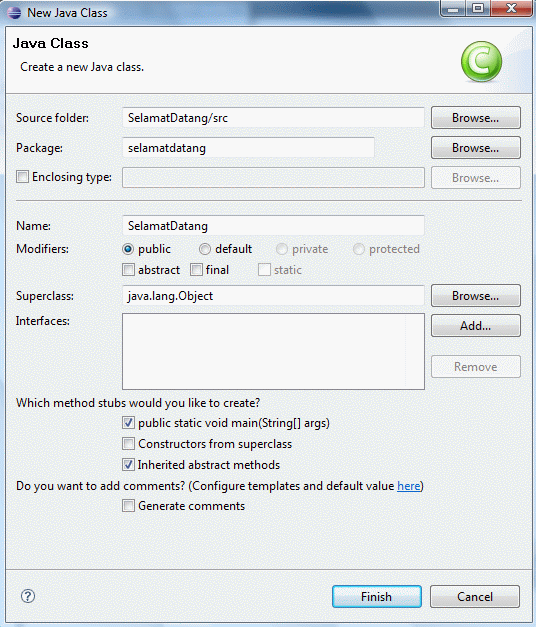


  • Click "Finish"
  • Eclipse will create a program that contains an empty package and class according to the name you entered in the previous stage
  • Now type the following programs under the "/ / TODO"
  • System.out.println("Selamat Datang!");
  • Then save the result
Running your first Java program :

  • To run your program, click "Run -> Run"
  • At the bottom of the tab titled "Console" program results are displayed
  • The program will feature writings Welcome! as in the picture below


And this is the result :     


NB         : If There is a difficulty, Stay Comments only. 
                It was rather difficult. 
                I will help as much as possible. 
                Thank's for your visit my blog.


»»  READMORE...

What is Eclipse ?

Eclipse IDE


Eclipse is an open source community that aims to produce an open programming platform. Eclipse consists of a framework that can be developed further, auxiliary equipment to create and manage software from the beginning to launch. Eclipse Platform is supported by a large ecosystem consisting of vendor technology, and innovative start-ups, universities, research institutions and individuals.

Many people know Eclipse as an IDE (integrated development environment) for Java, but Eclipse is more than a Java IDE.

Eclipse community has more than 60 open source projects. These projects are conceptually divided into 7 the category of:

1. Enterprise Development
2. Embedded and Device Development
3. Rich Client Platform
4. Rich Internet Applications
5. Application Frameworks
6. Application Lifecycle Management (ALM)
7. Service Oriented Architecture (SOA)
Generally used Eclipse to build innovative, industry-standard software, and tools along frameworknya help job easier.

License

Eclipse uses EPL (Eclipse Public License), the license that enables organizations to make Eclipse a commercial product, and at the same time asking people to contribute to change the result back to the community.

Installation

  • You need a Java 5 JRE to run Eclipse.
  • Download Eclipse IDE for Java Developers to use Learning Java code on this site.
  • Use your operating system utility to uncompress the file to your hard disk.
  • Note for Windows : If you use a file compression utility from Windows XP or Windows Vista itself, the utilities are sometimes unable to open files with long names. If you are having problems decompressing Eclipse on Windows, put the results of decompression in the root directory (eg C: \ eclipse) or use other free decompression software such as 7-Zip.
»»  READMORE...

The introduction of Java in Eclipse

History of Eclipse


         Eclipse was originally developed by IBM to replace software IBM Visual Age for Java 4.0. This product was launched by IBM on November 5, 2001, who invested as much as U.S. $ 40 million [1] for development. Since then the Consortium Eclipse Foundation Eclipse took over for further development and organizational arrangements.

Eclipse is an IDE (Integrated Development Environment) to develop software and can run on any platform (platform-independent). Here is the nature of Eclipse:


  • Multi-platform : Eclipse target operating system is Microsoft Windows, Linux, Solaris, AIX, HP-UX and Mac OS X.
  • Mulit-language : Eclipse was developed with the Java programming language, but the Eclipse-based application development support other programming languages​​, such as C / C + +, Cobol, Python, Perl, PHP, and others.
  • Multi-role : In addition to the IDE for application development, Eclipse can be used for activities in the software development cycle, such as documentation, test software, web development, and so forth.

Eclipse at the moment is one of the favorite IDE because of free and open source, which means that anyone can view the programming code of the software. Furthermore, the advantages of the Eclipse that makes it popular is its ability to be developed by users with components called plug-in.

Architecture


Since version 3.0, Eclipse is essentially a kernel, which raised plug-in. What can be used in Eclipse is actually a function of the plug-in is installed. This is called the base of the Eclipse Rich Client Platform (RCP). The following are the components that make up the RCP:

  • Core platform
  • OSGi
  • SWT (Standard Widget Toolkit)
  • JFace
  • Eclipse Workbench

By default Eclipse JDT always comes with (Java Development Tools) plug-ins that make compatible Eclipse to develop Java programs, and PDE (Plug-in Development Environment) to develop new plug-ins. Eclipse with its plug-in is implemented in the Java programming language.

The concept Eclipse IDE is an open (open), easily expandable (extensible) for anything, and not for anything specific [2]. So, not only Eclipse to develop Java programs, but can be used for various purposes, simply by installing the plug-in required. If you want to develop a C / C + + plug-ins are CDT (C / C + + Development Tools). In addition, the development of visually not impossible by Eclipse UML2 plug-in available to create UML diagrams. By using PDE every person can make a plug-in accordance with her wishes. One site that offers free plug-ins such as the Eclipse downloads by project.

Controversy Eclipse


The presence in the middle Eclipse IDE competition, especially Java IDE, causing much controversy. One is the use of the Eclipse user interface. Sun Microsystems as a company that makes Java, has been issued two libraries for the development of Graphical User Interface (GUI), the Abstract Windowing Toolkit (AWT) and Swing. However, in the manufacture of Eclipse, the two libraries was abandoned for various reasons, one of which is the second library does not provide a good look and feel. So to it is developing a new GUI library, SWT.
In addition, Sun has its own IDE for Java development called NetBeans, Eclipse becomes stifling the presence of hitherto fairly large communities [3]. This can be seen with the Sun refused to cooperate in the Eclipse Foundation, though it was invited [4].
Name Eclipse as if giving the message explicit: Sun light (sun) which emit blocked by Eclipse (eclipse).


»»  READMORE...

Rabu, 05 September 2012

Convert numbers decimal with Java

Welcome to my blog.Back again with my post
This time I will give java post interesting lessons
so check this out ..
convert decimal numbers with java --->


step one, please look coding above
use application the name is Net beans
chect this out....

package Praktek1;

import java.util.Scanner;
import javax.swing.JOptionPane;

public class latihan_konvers {
    //global variable
    static String name;//object
    static String kelamin;
    static int bilDes;//variable

    //fingsi/method rekursi
public static void Biner(int n){
    if(n>1) {Biner(n/2);}
    System.out.print(n%2);
}
public static void Hexa(int n){
    char[] daftarHexa={'0','1','2','3','4','5','6','7','8','9','A','B','C','D','E','F'};
    int sisaBagi = n%16;
    if(n>0){
        Hexa((n - sisaBagi) / 16);
    }
    System.out.print(daftarHexa[n%16]);
}
public static void Oktal(int n){
    char[] daftarOktal={'0','1','2','3','4','5','6','7'};
    int sisaBagi = n %8;
    if(n>0){
        Oktal((n - sisaBagi) / 8);
        System.out.print(daftarOktal[n%8]);
    }
}
public static void inputDes(){
    System.out.print("Masukkan Bilangan Desimal= ");
    Scanner inputan=new Scanner(System.in);
    bilDes=inputan.nextInt();
    //return bilDes
}
public static void tampilBiner(){
    inputDes();
    System.out.print("Binernya adalah ");
    Biner(bilDes);
}
public static void tampilHexa(){
    inputDes();
    System.out.print("Hexanya Adalah ");
    Hexa(bilDes);
}
public static void tampilOktal(){
    inputDes();
    System.out.print("Oktalnya adalah ");
    Oktal(bilDes);
}
public static int inpBil (){
    System.out.println("=========================================="
            + "\nSelamat datang "+kelamin+" "+name+"");
    System.out.println("Silahkan memilih menu konversi "
            + "Bilangan ke: "+
            "\n1. Biner \n2. Hexa \n3. Oktal \n4. Exit");
    System.out.print("Masukkan Angka Menu= ");
    Scanner inputan=new Scanner(System.in);
    int pilmenu=inputan.nextInt();
    return pilmenu;
}
public static void menU(int pil){
    System.out.println("\033");//clear screen
    switch(pil){
        case 1: tampilBiner(); break;
        case 2: tampilHexa(); break;
        case 3: tampilOktal(); break;
        case 4: System.out.println("Kamsia ya, sudah mampir.");
                System.exit(0); break;//memberikan kondisi FALSE
        default:System.out.println("(Maaf. Pilih angka 1-4 saja!)");
        break;
    }
    System.out.println("\033");//clear screen
}
public static void main(String arg[]){
    name=JOptionPane.showInputDialog("Masukkan nama Anda : ");//menampilkan input dialog untuk memasukkan nama
    //menampilkan Option Dialog untuk memilih jenis kelamin
        String[] choices = {"Perempuan", "Laki-Laki", "WARIA"};

        String Perempuan= "Mbak";
        String Laki= "Mas";
        while (true) {
            int response = JOptionPane.showOptionDialog(
                               null
                             , "Apa jenis kelamin Anda ?"
                             , "Jenis Kelamin"
                             , JOptionPane.YES_NO_OPTION
                             , JOptionPane.QUESTION_MESSAGE
                             , null
                             , choices
                             , "Quit"
                           );
        switch(response){
            case 0 : kelamin = Perempuan;
                break;
            case 1 : kelamin = Laki;
                break;
            case 2:
                System.out.println("maaf gak bisa kalo gak laki laki atau perempuan,silahkan melakukan penetapan kelamin!! ");
                     System.exit(0); break;
        }
    do{
        menU(inpBil());
    }
    while(true);
        }
}
}

                                    click shift+f6. then...

enter your name

choose your gender , for example, "Laki-laki"

If you click on one of the man will appear :


Example write the numbers 1, as shown :


Then insert the decimal number :
and will see the results of binary


To exit, content with the number 4:


and finish ..
That was my post, maybe useful if there is a lack of forgiveness.


»»  READMORE...

Senin, 30 Juli 2012

Interesting features of Java


Java features are of interest:


                                      Some of the features offered by the Java API are as
                          the following:

a. Applet
            Java program that can run on the browser, which can be
create HTML pages more dynamic and interesting.

b. Java Networking
              A set of API (Application Programming Interface)
provides functions - functions for applications - network applications,
such as providing access to TCP, UDP, IP and URL adrress.
But Java Networking does not provide access to ICMP
due to security reasons and in general just kondidi
administrator (root) can utilize the ICMP protocol.

c. Java Database Connectivity (JDBC)
             JDBC provides a set of APIs that can be used to
access to databases such as Oracle, MySQL, PostgreSQL,
Microsoft SQL Server.

d. Java Security
      Java Security provides a set of APIs to manage
security of Java applications either high level or low level,
such as public / private key management and certificates.

e. Java Swing
             Java Swing provides a set of APIs for building
application - the application GUI (Graphical User Interface) and GUI models
desired can be wide - range, able to model Java, model
Motif / CDE or model dependent on platform
is used.

f. Java RMI
           Java RMI provides a set of APIs for building
applications - a Java application that is similar to the model of RPC (Remote
4
Procedure Call) finished object - the Java object can call remotely
on a computer network.

g. Java 2D/3D
             2D/3D Java provides a set of APIs for building
charts - 2D/3D charts are interesting and also access to a printer.

h. Java Server Pages
      Developing from Java Servlet is used to
replace the application - the application CGI, JSP (Java Server Pages)
Similar ASP and PHP is the best alternative to the solution
Internet applications.

i. JNI (Java Native Interface)
             JNI provides a set of APIs that are used to
access function - the function of the library (*. etc or *. so) that
made with other programming languages ​​such as C, C + +, and
Basic.

j. Java Sound
        Java Sound provides a set of APIs for manipulating
sound.

k. CORBA IDL + Java
           Java IDL (Interface Definition Language) provides support
Java for the implementation of the CORBA (Common Object Request
Broker) which is a distributed-object models for solutions
large applications in the networking world.

l. Java Card
          Java Card is used primarily for applications - applications on
smart card, a simple form like SIM Card on
phone.

m. JTAPI (Java Telephony API)
        Telepony Java API provides a set of APIs for
utilizing devices - devices telepony, so it will fit
for applications - applications CTI (Computer Telephony Integration)
required such as ACD (Automatic Call Distribution), PCPBX
and others.
»»  READMORE...

Minggu, 22 Juli 2012

A Glimpse of JavaFX


JavaFX is a Java technology that is intended to build or design applications with rich multimedia content such as graphics; Sound; Effect Graphics, and Video; were integrated into the WEB Site to the Internet or intranet.
JavaFX is often called RIAs (Rich Internet Applications), application examples RIAs are: framework; Curl; GWT; Adobe Flash / Adobe Flex / AIR, Java / JavaFX; Mozilla XUL, and Microsoft Silverlight. RIAs are applications of semantic Web (Semantic Web Application) which is largely derived from the characteristics of desktop applications, in other words we can bring to the desktop environment in a Web browser, for example, on the desktop we can see from our photo collection of thumbnails, play music, watch videos, and much more; so also allows running in a web browser. Desktop applications can be delivered in a standard web-browser-based or independently via sandboxes or virtual machine, and this is the advantage possessed by JavaFX and JavaFX as well as a differentiator with Java technology previously owned by such JSE (Java Standard Edition), JEE (Java Enterprise Edition), JME (Java Micro Edition) and has the disadvantage that requires a lot of resources or applications High End.
JavaFX Developer introduced directly by the head of Sun Microsystems, James Gosling. By James Gosling project was launched to provide a higher level of security and well that is not owned by yourself using AJAX because AJAX Javascript that was not designed with security and privacy are high and good. James Gosling believes in addition to a high level of security and well, and is also coupled with the ease of designing a program and more declarative, JavaFX able to compete with AJAX is considered too complex to be done by a non-programmer.
When programming AJAX Developer requires a skill to master coding techniques, one thing that is not owned by the makers website, and is an obstacle for them in expressing their website demanded more expressive and dynamic. Sun believes that JavaFX can overcome this problem and target JavaFX and JavaFX Script to be didaya use by Developers who are not programmers.
JavaFX promising web creations that can be run on a computer, digital TV, regular TV and portable devices, and will look the same on all platforms.
JavaFX is very significant developments in the booming since in the year 2009, and has several advantages including:
1. Fully cross platform.
  Although officially solaris and linux versions have not been released, but has been able to run JavaFX
  in the neighborhood unix-based.
2. Integrating graphics with the help of tools from 3rd parties.
  JavaFX includes a set of plugins with Adobe Illustrator and Photoshop that allows to
  integrated directly into JavaFX applications.
3. Draggable applet / Drag to Install
  Maybe this is one of the most revolutionary of the JDK-update-N is, the applet
  fact of life in our browser, we can now pull out of the browser, and can still be
  active.


                                                        Advantage of using javafx


Why should wear JavaFX?
Because Java is the parent of the JavaFX can run on all sorts of devices, and its presence can be integrated with RIA technology as described above. As in the manufacture of desktop applications, Web, and Mobile as well as the Digital TV. Besides JavaFX is also designed to optimize the view supported by JavaSwing, Java 2D and Java3D for Developers and Research. JavaFX structure is also very suitable for display to the GUI, making it easier to read and corrected.
Later there will be an easy to use visual designers to build applications or web-based applications for mobile JavaFX including using JavaFX mobile products.
Unlike its predecessor, JavaFX technology using its own programming language called JavaFX Script. And the file extension *. Fx.
»»  READMORE...

The Development of Java


The development of Java

Early versions of
Early versions of Java in 1996 is already a version release so called Java Version 1.0. Java version includes a number of standard packages are being developed at the beginning of the next version:
~  java.io: Appropriation grade input and output, including the use of the file.
~  java.util: allotment supplementary classes as data structures class and classroom class calendar.
~  java.net: Appropriation grade TCP / IP, which allows to communicate with other computers using TCP / IP.
~ java.awt: The base class for applications with user interfaces (GUI)
~ java.applet: The base class interface applications to be implemented on a web browser.

Excess
~  Multiplatform. The major advantage of Java is that it can run on multiple platforms / systems computer operations, in accordance with the principle of write once, run anywhere. With these advantages programmers simply write a Java program and compiled (modified, from human understandable language into machine language / bytecode) once and the results can be run on multiple platforms without modification. This advantage allows a Java-based program is done on the Linux operating system but run well on Microsoft Windows. Platforms supported to date is Microsoft Windows, Linux, Mac OS, and Sun Solaris. The cause is any operating system uses its own program (which can be downloaded from Java) to interpret  bytecode.
~  OOP (Object Oriented Programming - Object Oriented Programmer)
~  The Complete Class Library, Java is famous for its completeness library / library (a collection of programs that are included in the Java programming) is very easy to use by the programmers to build applications. Completeness library coupled with the presence of a large Java community that continuously create new libraries to encompass the entire application development needs.
~ C + + style, has the syntax of programming languages ​​such as C + + so it attracts a lot of C + + programmers moving to Java. Currently Java users very much, mostly C + + programmers moving to Java. Universities in the United States also began to move with Java to teach new students because it is more easily understood by the students and can be useful also for those who are not majoring in computer.
~ automatic garbage collection, features memory usage settings so the programmer does not need to make arrangements memory directly (as in C + + is widely used).
Shortage
~ Write once, run anywhere - There are still some things that are not compatible between the platforms of the other platforms. For J2SE, for example SWT-AWT bridge which until now does not work on Mac OS X.
~  Easy in decompilation . Decompilation is the reverse of the code so a source code. This is possible because the code is so Java bytecode languages ​​with a lot of high-level attributes, such as the names of classes, methods, and data types. The same thing happened to Microsoft. NET Platform. Thus, the algorithm used the program would be more difficult to hide and easily hijacked / direverse-engineer.
~  Use a lot of memory. Memory usage for a Java-based program is much larger than the previous generation of high-level languages ​​such as C / C + + and Pascal (more specifically, and Object Delphi Pascal). Usually this is not a problem for those who use the latest technology (as trends increasingly cheap memory installed), but it becomes a problem for those who still have to stick with the old computer machine over 4 years.
Simple Example Program Code In Java
Hello world program examples are written using the Java programming language is as follows:
/ / Outputs "Hello, world!" and then exits
public class HelloWorld {
   public static void main (String args []) {
       System.out.println ("Hello, world!");
   }
}

»»  READMORE...

Sabtu, 21 Juli 2012

Know the History of Development of Java


Understanding Java: is a programming language that can run on different computers, including mobile phones. Developed by Sun Microsystems and released in 1995. Java should not be in misunderstand by javascript.
Javascript is a scripting language used by web browsers.

Java programming language is the first born of The Green Project, which runs for 18 months, from the beginning of 1991 until the summer of 1992.


This job was closed by generating a Java program Oak first, which is intended as a hardware controller with touch screen technology (touch screen), such as a PDA pad today. The new technology is called "* 7" (Seven Star).
This project on the monitor by:
~ Patrick Naught
~ Mike Sheridan (his photo):


and
~ Bill Joy (His photo)


As well as nine other programming from Sun Microsystems. One result of this project is made ​​by the Duke mascot Joe Palrang.


After 7 Start era ends, a cable TV subsidiary interested in that. Therefore with some of the GREEN PROJECT began to focus attention on this matter. The company is finally experiencing a significant increase in the range of time pretty quickly.
In this era of Internet users initiated in order to smooth the communication to convey their ideas or useful inputs for the project. They make the browser (browser) Mosaic as an initial basis for making the first browser, called Java Web Runner, inspired by the 1980 movie, Blade Runner.


In the development of the first release, renamed Runner's Hot Java.
In about March 1995, for the first time 1:02 version of Java source code open. Their success was first published in the newspaper San Jose Mercury News.
But unfortunately in this project would be schism in which three of the project's main leader, Eric Schmidt and George Paolini from Sun Microsystems with Marc Andreessen, Netscape formed.


Major Oak, taken from an oak tree that grew in front of the workspace window "father of Java" James Gosling. Major Oak is not used for Java release version as a software has been registered with the trade mark, the replacement name to "JAVA". But this is taken from the ground pure coffee beans directly from (brewed coffee) Gosling's favorite.


Early versions:
Early versions of Java in 1996 is already a version release so called Java Version 1.0. Java version includes a number of standard packages are being developed at the beginning of the next version:
· Java.lang: Appropriation grade basic elements.
· Java.io: Appropriation grade input and output, including the use of the file.
· Java.util: allotment supplementary classes as data structures class and classes calendar.
· Java.net: Appropriation grade TCP / IP, which allows to communicate with other computers using TCP / IP.
· Java.awt: The base class for applications with user interfaces (GUI)
Java.applet: The base class interface applications to be implemented on a web browser.
»»  READMORE...

A little Short History of Java


               Java was officially introduced by SUN in the world on May 23 1995.Java first-born of The Green Project, which lasted for 18 months, from 1991 until 1992. The project is not using version named Oak. The project was led by Patrick Naughton, Mike Sheridan, James Gosling and Bill Joy, along with nine other programmers from Sun Microsystems. One result of this project was made by the Duke mascot Joe Palrang. Meeting project in an office building Sand Hill Road in Menlo Park. Around 1992.
· Java is a programming language that can run on various computer including mobile phones. The language was originally created while still join by James Gosling at Sun Microsystems is now a part of Oracle, and was released in 1995. These languages ​​are adopting syntax contained in C and C + + syntax but with a simpler object model and support for lower-level routines are minimal. Java-based applications are generally compiled into p-code (bytecode) and can be run on different Java Virtual Machine (JVM). Java is a programming language that is general / non-specific (general-purpose), and is specifically designed to utilize minimal implementation dependencies. Because of its functionality which allows Java applications capable of running on several different operating system platforms, also known as Java mantra of "Write once, run anywhere".
· Early versions of Java in 1996 is already a version release so called Java Version 1.0. Java version includes a number of standard packages are being developed at the beginning of the next version:

· Java.lang: Appropriation grade basic elements.

· Java.io: Appropriation grade input and output, including the use of the file.

· Java.util: allotment supplementary classes as data structures class and classroom class calendar.


»»  READMORE...